
An active Lg Refrigerator Error Code Cl simply means the Child Lock feature is currently engaged on your display panel. You don’t need a repair technician or any spare parts because this is a standard setting, not a mechanical failure. To turn it off, press and hold the Lock or Child Lock button on your control panel for exactly three seconds until the indicator light turns off. This simple action will reset the display and restore full functionality to your water dispenser and temperature controls immediately.
What the sign is telling you
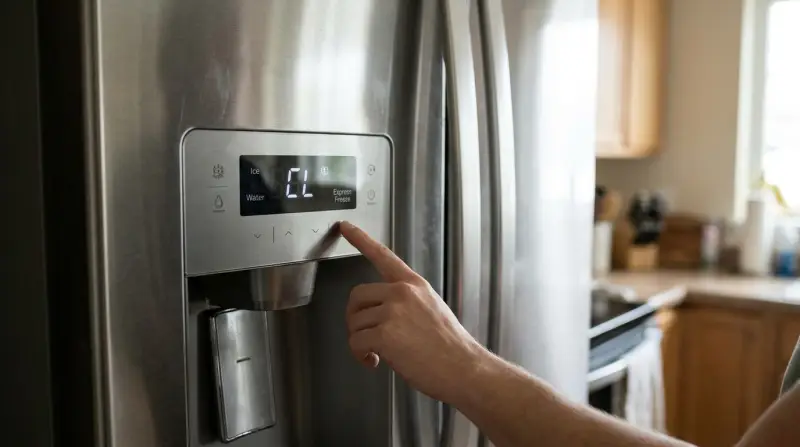
The control panel uses this code to prevent unintended changes to your settings or accidental water dispensing by children.
| What you notice | What it usually means | What to do first |
|---|---|---|
| Cl shows on screen | Child lock is active | Hold Lock for 3 seconds |
| Buttons don’t work | Lock feature is enabled | Hold Lock for 3 seconds |
| Dispenser won’t run | Child lock is engaged | Hold Lock for 3 seconds |
| Settings can’t change | System is currently locked | Hold Lock for 3 seconds |
You can distinguish a lock-out from a hardware failure by watching the display. If the screen flashes “Cl” when you touch a button, the system is functioning correctly but restricted. If the screen remains entirely blank despite pressing buttons, check the power supply before assuming the lock is the culprit.
Many users mistakenly attempt to reset the unit by unplugging it. This is a common error that causes the system to reboot, but the lock state is stored in non-volatile memory. You’ll simply return to the same locked state once power is restored.
Unlocking the control panel
The primary cause for this code is an accidental touch of the button. Most modern LG refrigerators feature a touch-sensitive interface. If you lean against the panel or if a child touches the buttons, the system enters a safety mode to prevent tampering. This is a deliberate design choice to protect your temperature settings and water filter usage data from being reset by accident.
To confirm this is the only issue, look at the rest of your appliance. If the refrigerator is cooling properly and the interior lights turn on when you open the door, the system is working perfectly. The error is strictly a notification that the user interface is restricted. You can verify this by attempting to change the temperature; if the numbers don’t blink or change, the lock is definitely the cause.
The fix is straightforward. Locate the button labeled “Lock” or “Child Lock” on your display. Press it and keep your finger there for three full seconds. You’ll often hear a confirmation chime once the system releases the lock. If you have a model with a physical button, ensure you press it firmly. For touch-sensitive models, a light but steady tap for the full duration is necessary. Once the letters disappear from the screen, test the water dispenser or the temperature adjustment buttons. If the dispenser works and the display responds, you have successfully cleared the status. If the code persists after a three-second hold, wait ten seconds and try holding the button for five seconds to account for variations in sensor sensitivity across different LG product manuals.
Accidental activation patterns
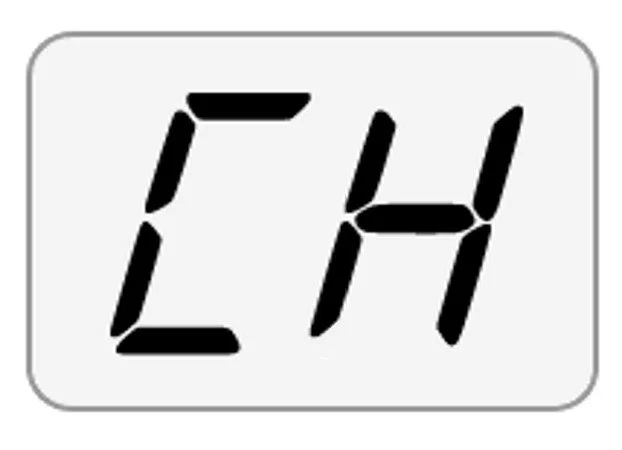
Sometimes the lock engages because of how the refrigerator is used during daily cleaning or routine access. If you wipe down the front panel with a damp cloth, the moisture or pressure can mimic a finger press. This is a common mistake that leads people to believe their control board has failed. It costs nothing to fix, but many users mistakenly call for service when a simple press resolves the issue.
This behavior differs from the first cause because it’s triggered by external contact rather than a user intentionally pressing the button. If you find the lock active every time you clean the kitchen, you’re likely triggering the sensor while wiping the surface. You can distinguish this from a system error by checking if the refrigerator is still cooling. If the unit remains cold and the compressor is running, there’s no mechanical fault.
To resolve this, avoid using excessive liquid when cleaning the display. Use a dry microfiber cloth to remove fingerprints instead of a wet sponge. If the screen becomes unresponsive even after you release the lock, ensure your hands are dry before you attempt to hold the button again. Moisture on the panel can cause the touch sensor to remain “stuck” in a pressed state, preventing the unlock command from registering. If the screen is completely black or shows other numbers, this isn’t a child lock issue, and you should check if the main power plug is loose in the wall outlet.
System communication limits
The least common cause for this code is a temporary glitch in the display’s software. Sometimes the control board fails to process the unlock signal correctly due to a minor power surge or a momentary drop in voltage. Unlike the previous two causes, this happens without any physical contact with the buttons.
You can tell this apart from the other causes if you have already held the lock button for three seconds and the code remains visible. If the appliance is otherwise healthy, you can perform a soft reset. Unplug the refrigerator from the wall outlet or flip the circuit breaker dedicated to the kitchen appliance. Leave the power off for exactly sixty seconds to allow the capacitors on the control board to discharge fully. Plug the unit back in and wait for the display to initialize.
If the code remains, try the three-second hold again after the power cycle. This process clears the temporary memory of the display panel. If the code is still present after a power reset and the button press, the issue may be a hardware fault in the interface board. This is rare and usually happens only after a significant power surge. If you have done these steps and the display still shows the code, don’t attempt to disassemble the panel. The electronics are sensitive, and the internal components can hold a charge even when unplugged, which poses a safety risk to anyone without proper training.
When to stop and get help
If the display remains frozen on the code after you have tried a full power reset, the control board may have a hardware failure. A reset should take no longer than ten minutes. If the code persists after that window, the board is likely physically compromised.
If you see sparks, smell burning plastic, or notice smoke coming from the control panel area, cut the power at the breaker immediately. Don’t wait to unplug the unit. These signs indicate a short circuit that poses a genuine fire risk.
If the interior temperature rises above 40°F, the appliance isn’t cooling and needs professional attention to prevent food spoilage. Use a standalone thermometer to verify this reading if the digital display is unreliable.
If you hear a loud, grinding noise from the back of the unit, this indicates a mechanical issue that requires a qualified service technician. This sound often signals a failing compressor or a seized fan motor.
Don’t attempt to open the control panel housing or touch the electrical wiring behind the display. These components operate at high voltages that can cause serious injury. If the steps above don’t clear the error, contact an authorized service provider to inspect the control board. Attempting to repair the electronics yourself will void your manufacturer warranty and may cause further damage to the appliance.
Frequently asked questions

Can I turn off the lock if the panel is frozen?
Yes, you can usually clear a frozen panel by performing a hard power reset. Unplug the refrigerator for one minute to drain the residual energy from the board, then plug it back in. Once the display restarts, try holding the lock button for three seconds again. If the panel remains unresponsive after a reboot, the internal hardware may require a professional diagnostic check by an authorized service center.
Does this code mean my fridge is broken?
No, the code is a standard indicator for the child lock feature and doesn’t mean your appliance is broken. It’s a safety setting designed to keep your settings secure. As long as your refrigerator is cooling food and the lights work, your unit is functioning exactly as intended. You only need to follow the manual reset procedure to return the display to its normal state.
How long should I hold the button?
You should hold the button for three seconds to deactivate the lock. Most LG models are programmed to respond only after this specific duration to prevent accidental toggling. If the code doesn’t disappear, try holding it for up to five seconds. If it still doesn’t clear, verify that you’re pressing the button labeled specifically for the lock function and not the water filter or energy saver button.
Is it safe to use the fridge with this code?
Yes, it’s perfectly safe to continue using your refrigerator while this code is active. The lock only prevents you from changing settings or using the dispenser; it doesn’t stop the compressor or the cooling system. Your food will remain at the correct temperature, and the appliance will continue to operate normally until you’re ready to unlock the display and adjust your settings again.
What happens if the code won’t go away?
If the code persists after a three-second hold and a power reset, the display board may have a software or hardware fault. Check your owner’s manual to ensure your specific model doesn’t have a unique unlock combination, such as holding two buttons at once. If you have tried all combinations and the code remains, the issue is beyond a simple user fix and requires a technician’s inspection.
Does it matter if I have a water dispenser?
Yes, the child lock is specifically designed to disable the water and ice dispenser to prevent water spills and accidents. If your model has a dispenser, the lock will effectively stop it from working until you clear the code. This is a deliberate safety feature, not a malfunction. Once you successfully unlock the panel, the dispenser will immediately regain its functionality and allow you to dispense water and ice again.
Final Thoughts
If this light won’t go away after you’ve tried these steps, there might be a minor glitch in the control board. You shouldn’t worry, as unplugging the fridge for a few minutes often clears the system. If it’s still stuck, it’s a good idea to check your manual for further troubleshooting.