
A power cycle or a loose connection is the most common reason for an Onn Tv Not Turning on, so start by unplugging the device from the wall for at least 60 seconds. If the screen remains black, the issue usually stems from a failed remote, a faulty power cable, or an internal hardware failure that requires professional service. This assumes your power outlet is working; if other devices plugged into that same outlet also fail, the problem is with your home wiring rather than your television.
Why this happens

Most television start-up issues are caused by temporary electrical glitches or simple hardware failures. When a television is left in standby mode, the internal software can sometimes lock up, preventing the screen from waking up even when the power light indicates activity. This is similar to a computer freezing; a full power cycle clears the temporary memory and forces the system to reboot.
Another cause is a simple lack of power reaching the main board. This often happens because the power cord has worked itself loose from the back of the set or the wall socket. Even if the cable looks secure, a small vibration can break the contact. Furthermore, the remote control often gets blamed for a blank screen when it’s actually the source of the problem. If the infrared signal is blocked or the batteries have died, the television will stay in its off state regardless of how many times you press the button.
Finally, some units suffer from internal component failure. This varies by model — check the label on the back for your specific version number. If you hear a clicking sound or see a blinking light pattern, this usually indicates that the power supply board inside the unit has failed. This is a hardware issue that you can’t fix safely at home. If you suspect internal damage, consult the official support resources provided by Walmart or the manufacturer listed in your user manual.
Fixing an Onn TV Not Turning On: Check Your Power
This fix is for users who suspect their television isn’t receiving any electricity at all. First, confirm that the outlet itself is live by plugging a small lamp or a phone charger into the same wall socket. If the lamp doesn’t turn on, you have a tripped circuit breaker or a faulty outlet, which is a job for an electrician.
If the outlet works, turn your attention to the power cable. Ensure the plug is pushed firmly into the wall and that the connector on the back of the television is seated correctly. If you’re using a power strip or a surge protector, remove it and plug the television directly into the wall outlet. Many power strips have built-in circuit breakers that can trip during a surge, cutting power to the device even if the strip itself seems fine.
Once the cord is firmly in the wall, wait at least one full minute before plugging it back in. This time allows the residual electricity to drain from the internal capacitors. If the power light doesn’t illuminate after you reconnect the power, the issue is likely a damaged cord or a failed internal power board. If the light comes on but the screen remains dark, proceed to the next step.
Test the remote control
This fix is for when the television has power but refuses to respond to your commands. First, look for a physical power button on the television itself. Most models have a small button located under the bottom bezel or on the side panel. If the television turns on when you press this physical button, your remote is the problem.
If you have a spare remote that uses the same frequency, try using it instead. If you don’t have a spare, replace the batteries with a fresh set. People often make the mistake of assuming the batteries are fine because the remote light flashes; however, a low-voltage battery can send a signal that’s too weak for the television to process.
You can also check if the remote is sending a signal by using your smartphone. Open your phone’s camera app and point the top of the remote directly at the lens. Press the power button on the remote while watching the phone screen. If the remote is working, you’ll see a faint purple or white light flashing on the display. If you don’t see any light, the remote is broken or the batteries are dead. If the remote passes this test but the television still doesn’t respond, the internal infrared sensor on the TV may be faulty.
Evaluate professional repair options
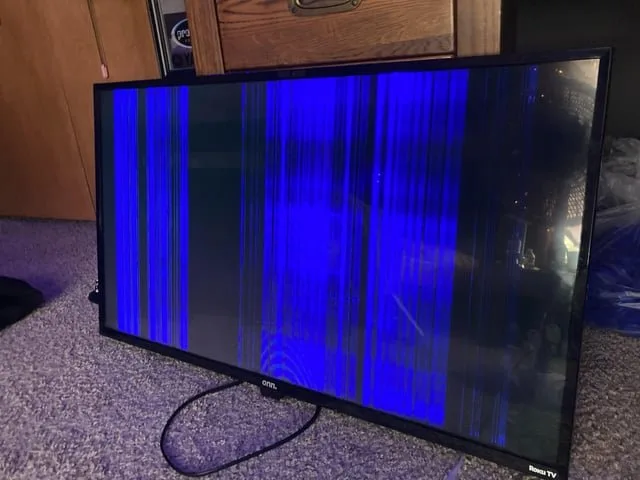
This fix is for when the simple power and remote checks have failed and the screen remains completely unresponsive. If you have confirmed that the outlet provides power and the manual power button on the television doesn’t trigger a response, the fault is almost certainly internal.
At this stage, you must decide if the cost of professional repair is worth the current value of the television. If the unit is still under its original warranty, don’t attempt to open the housing, as this will void your coverage and could expose you to electrical shock. Contact the manufacturer directly to initiate a warranty claim.
If the television is out of warranty, call a local repair shop to ask for a diagnostic estimate. Many shops charge a small flat fee just to open the unit. Ask if this fee is applied toward the final repair cost if you choose to proceed.
Be aware that replacing internal boards like the power supply or the main logic board often costs a significant portion of the price of a new unit. If the repair cost exceeds half the price of a new, similar-sized television, it’s usually more economical to replace the device.
Never attempt to handle internal components yourself. Television power supplies hold a lethal charge for a long time after being unplugged. You risk serious injury or fire if you touch the internal circuitry without proper training and specialized equipment. If you hear a high-pitched whining sound or smell ozone when the unit is plugged in, unplug it immediately and leave the room; these are signs of a failing capacitor that could lead to a localized fire.
What not to do
Don’t spray liquid cleaners directly onto the screen or into the vents. Moisture can drip onto internal boards and cause a permanent short circuit. If you must clean the screen, dampen a microfiber cloth slightly and wipe gently. Never use glass cleaners containing ammonia or alcohol, as these strip anti-glare coatings.
Don’t leave the television plugged in during a severe thunderstorm. Lightning strikes can destroy the internal power supply instantly. A surge protector is a necessary buffer, but it can’t stop a direct strike. If you hear thunder, unplug the device entirely to be safe.
Don’t force a power cord into an outlet. If it doesn’t fit, you likely have a grounding issue or a mismatched voltage requirement. Forcing it creates a fire hazard by increasing resistance at the connection point.
Don’t shake or hit the television to fix a loose connection. This often cracks the display panel or causes internal components to break off their mounts. If the image flickers, check the HDMI cable seating instead.
Don’t attempt to open the rear panel. Capacitors can hold enough voltage to cause a dangerous shock even when the unit is unplugged. If the device fails, contact a certified technician.
How to stop it happening again
To keep your television running, you should prioritize stable power and proper ventilation.
| If you’re doing this | Do this instead | Why |
|---|---|---|
| Leaving the TV on 24/7 | Use the sleep timer | Reduces heat and wear on internal parts |
| Using cheap power strips | Use a quality surge protector | Prevents voltage spikes from frying boards |
| Blocking the rear vents | Keep 4 inches of space | Prevents overheating and board failure |
| Ignoring remote lag | Change batteries early | Prevents signal errors and command delays |
Most users mistake a flicker for a failing screen, but the culprit is often a dying capacitor caused by power instability. If your TV takes longer than five seconds to wake from standby, your power supply board is likely struggling.
The decision rule is simple: if the unit feels hot to the touch after two hours of use, you must increase clearance.
Frequently asked questions

Can a power surge cause an Onn TV to stop working?
A power surge can instantly damage your television’s internal power supply board, rendering the device unresponsive. Sensitive electronics often fail to protect the rest of the system during such events. If other electronics in the same room are also malfunctioning, the issue likely stems from your home’s electrical supply or the outlet itself.
How long should I leave the TV unplugged to reset it?
You should leave the television unplugged for at least 60 seconds to ensure a full power cycle. This duration allows the capacitors inside the television to completely discharge their stored energy. If you plug the device back in too quickly, the internal memory may not clear, and the television will remain in its frozen state. Always wait for the full minute before reconnecting the cable to the wall outlet.
Is it safe to use a universal remote with my TV?
Yes, it’s safe to use a universal remote as long as it’s compatible with your specific model. Many universal remotes allow you to input a code to sync with your device. Ensure the remote is programmed correctly by following the manual provided by the remote’s manufacturer. If the universal remote doesn’t work after proper programming, the infrared receiver on your television might be the component that has failed.
What happens if the power light blinks but the screen is black?
A blinking power light usually indicates an internal error or hardware failure that requires professional attention. These blink patterns often serve as diagnostic codes for technicians. You should stop attempting to power the device and contact a repair service, as opening the back cover yourself poses a significant risk of electrical shock.
Why does my TV make a clicking sound when I try to start it?
A clicking sound typically means the power supply board is trying to activate but failing due to a short or a faulty component. This is a common sign of hardware degradation. If you hear this sound consistently when you press the power button, the power supply board needs to be replaced. This is a technical repair that requires specialized tools and safety knowledge, so contact a professional service center.
Final Thoughts
If these simple checks don’t bring your picture back, it’s time to look at your warranty information. Don’t hesitate to reach out to the manufacturer’s support team for a repair or replacement. They’ll help you figure out if a technician needs to take a closer look at your device’s internal parts.
Related guides