
A Proform treadmill incline not working is usually caused by a simple sensor calibration error or a stuck lift mechanism that you can often fix by resetting the console. If your machine stops moving while changing grades, the internal computer has likely lost track of the current elevation. Always check that the power cord is pushed firmly into the wall outlet.
Why your Proform treadmill incline not working
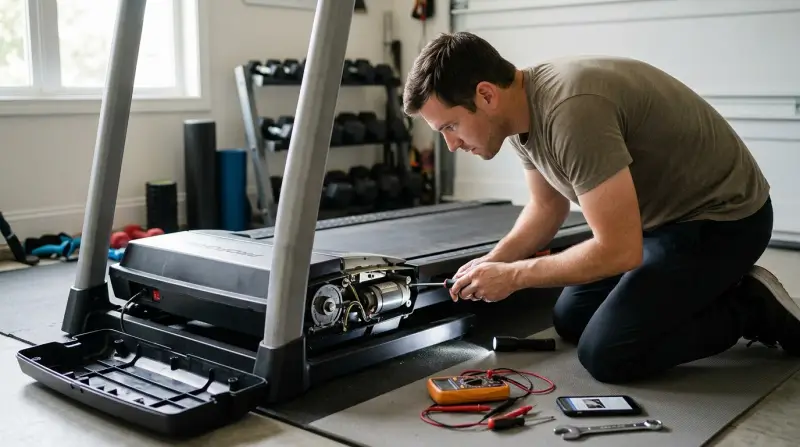
The incline system on your machine relies on a lift motor and a position sensor to determine how high the deck should be. When these components lose synchronization, the controller stops the motor to prevent damage to the frame. This often occurs after a power surge or a sudden stop during a workout. If the console doesn’t receive a clear signal from the incline sensor, it will display an error code or simply remain flat to protect the internal gears.
Another cause involves the physical environment around the machine. If you store items under the treadmill, they can interfere with the lifting arms. Even small objects like a stray dumbbell or a power strip can block the path of the motor. When the motor pushes against an object it can’t move, it creates a stall condition. This is a safety feature designed to prevent the motor from burning out.
Finally, the software on the console might need a hard refresh. Like any modern computer, the incline controller stores temporary settings. If these settings become corrupted, the console will ignore incline commands. You can verify the specific status of your equipment by checking the official Proform product support page for your specific model number, which provides the exact error codes used by the manufacturer to diagnose motor failures.
Reset the console settings
This fix is for users who see an error message on the screen or find that the incline buttons don’t trigger any motor sound. First, turn off the power switch and unplug the treadmill from the wall. Wait at least sixty seconds to allow the console to fully discharge its stored energy. Plug the treadmill back in and insert the safety key.
Next, look for the calibration mode in your console settings. This varies by model; check the label on your console or the manual for the specific button combination required to enter the “Test” menu. Typically, this involves holding down the “Stop” and “Incline Up” buttons simultaneously while inserting the safety key.
Once in the mode, press the incline button to let the machine move through its full range of motion. This allows the internal sensor to “re-learn” the minimum and maximum height positions. If the motor begins to move during this process, the system has successfully recalibrated.
A common mistake is failing to remove the safety key before starting the sequence. If you don’t perform this step, the console will ignore your input and remain locked in its current state. If the motor still doesn’t hum after a full cycle, check the wiring harness beneath the motor hood. A loose connection here is often the culprit rather than a failed board. If the console remains unresponsive despite these checks, you likely have a faulty lift motor or a damaged control board that requires a professional technician.
Clear the path of the lift motor
This fix is for users who hear the motor trying to work but see no movement, or who feel a grinding sensation when the incline changes. Start by inspecting the area directly underneath the treadmill frame. You need to ensure the space is completely clear of debris, cords, or storage boxes.
If the treadmill is on a thick carpet, the fibers can sometimes get caught in the lift mechanism. Use a flashlight to look under the motor housing for any trapped fabric or dust buildup. If you see an object blocking the arm, move the treadmill to a hard, level surface to gain better access.
Never reach into the mechanism while the treadmill is plugged in, as the lift arm can move suddenly and cause injury. Always pull the power plug before touching the motor housing. If you find an obstruction, remove it carefully.
After clearing the area, test the incline at a low speed. If the machine still struggles, check the lift arm’s alignment. If the arm is bent or the screw drive is visibly crooked, the internal gears are likely stripped. This is a mechanical failure that requires replacement parts.
The decision rule is simple: if the obstruction is external, you can fix it in minutes. If the motor hums but the screw drive doesn’t rotate, you’re facing a permanent hardware failure. Don’t force the incline button if you hear a clicking sound; this strips the remaining teeth on the gear, turning a simple repair into a full motor assembly replacement.
Check for loose wire connections

This fix is for users who have tried resetting the console and clearing the area, but the incline remains completely dead. A loose wire connection is a common mistake that people overlook, often caused by vibration during regular use. If the cable running from the console to the base of the machine has come loose, the signal to the incline motor will never arrive.
You should verify that the main data cable is pushed fully into the port on the back of the console and at the base connection point. Listen for a distinct “click” when seating the connector. If you see any bent pins or frayed wires, don’t attempt to reconnect them yourself.
This is who this isn’t for: if you aren’t comfortable working with electronics or if the machine is still under the original manufacturer’s warranty, don’t attempt to open the motor housing. Opening the housing on a unit under warranty will void your coverage.
The decision rule is simple: if the cable is merely unplugged, reseat it and test the incline. If you find internal damage or exposed copper, stop immediately. Attempting to bridge or splice these wires yourself can cause a short circuit in the motor control board, which is often an expensive part to replace.
What not to do
Don’t force the deck up or down by hand. This pressure snaps the lift screw or cracks the motor housing beyond repair. If the deck feels stuck, check for debris under the frame before applying force.
Avoid spraying lubricant into the motor housing. While it seems helpful, the oil attracts dust that creates a thick, insulating sludge. This buildup prevents heat dissipation, causing internal electronics to overheat and fail within weeks.
If the deck stops moving, wait sixty seconds for the system to reset.
Never bypass safety sensors by wiring the motor directly to power. This creates a severe fire hazard and permanently destroys the unit’s control board. If you suspect a sensor failure, have a technician confirm whether the part has failed.
How to stop it happening again
Regular maintenance prevents the buildup of friction that leads to motor failure. Most owners wait for a total breakdown, but the real cost is hidden in the gradual efficiency loss that burns out the internal capacitors.
| If you’re doing this | Do this instead | Why |
|---|---|---|
| Storing gear under the deck | Keep the area completely clear | Prevents physical motor stalls |
| Cleaning with a wet cloth | Use a dry, soft microfiber cloth | Prevents liquid shorting the console |
| Ignoring strange noises | Inspect the lift arm for debris | Catches mechanical issues early |
| Keeping the unit on carpet | Place on a hard, level surface | Reduces vibration and motor strain |
If you hear a rhythmic clicking, stop the machine immediately. This sound indicates the drive belt has slipped from its track. If the unit smells like ozone, unplug it and check the motor housing for trapped dust. If the housing is clean, the motor is likely failing and requires a professional replacement.
Frequently asked questions

Can I fix a broken incline motor myself?
You shouldn’t replace the lift motor yourself unless you have specific experience with high-voltage fitness equipment. This heavy component supports the user and deck, and improper alignment makes the treadmill unstable. Always hire a certified technician to handle internal motor replacements to ensure safety.
Why does my incline change on its own?
This usually happens because of a faulty console or a ghost signal from a damaged data cable. Moisture or sweat on the console can cause touch buttons to register false inputs. If the issue persists, the console membrane is likely failing and requires professional replacement.
How long should the incline take to move?
The movement speed depends on the specific model, but most treadmills take between ten and twenty seconds to travel from zero to the maximum incline level. This assumes the machine is operating under a normal load with no obstructions. If your treadmill takes significantly longer than this, the lift motor may be struggling due to age, lack of lubrication on the lift screw, or an internal mechanical obstruction that requires professional service.
Is it safe to use the treadmill if the incline is broken?
It’s generally safe to use the treadmill on a flat surface if the incline is stuck at zero percent. Ensure the deck is locked in the flat position and doesn’t wobble before you start. If the incline is stuck at an angle, don’t use the machine.
What happens if I ignore an incline error?
If you ignore an error code, the treadmill may eventually lock out all functions to protect the main control board. Modern treadmills use a central computer that monitors all motors for faults. You should address the error as soon as it appears to avoid a total system failure.
Final Thoughts
If these quick fixes don’t get your machine moving again, it’s time to reach out to the manufacturer’s support team. They’ll help you determine if a motor part needs a professional replacement. Don’t worry, you’ll be back to your regular walking routine once you’ve sorted out the technical side of things.