
When your Roomba won’t charge, it can quickly turn from a helpful cleaning robot into an expensive paperweight. This problem is surprisingly common and can happen to both new and old Roomba models. Often, the issue is simple to fix, but sometimes it needs more attention. If you’re struggling with a non-charging Roomba, you’re not alone. In this guide, you’ll learn how to diagnose the problem, find solutions, and get your robot back to work. Whether you’re a beginner or have owned several Roombas, these steps will help you avoid mistakes and save money.
Common Reasons Why Roomba Won’t Charge
Several things can cause charging problems. Identifying the root cause is the first step toward a solution.
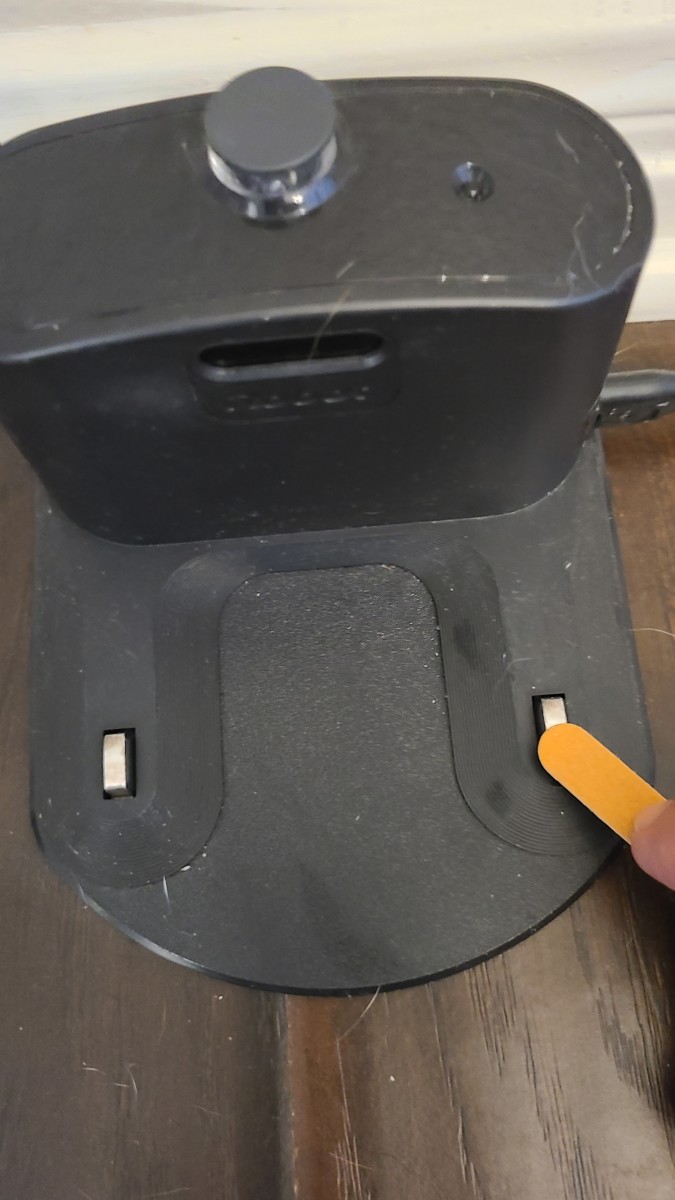
Dirty Charging Contacts
Dirt and dust often build up on the metal contacts of both the Roomba and its charging dock. Even a thin layer can prevent proper charging. Cleaning these contacts is one of the easiest fixes.
Battery Issues
Roomba batteries usually last 1–2 years with regular use. If the battery is old or defective, your robot may not charge at all. Some batteries also fail due to improper charging habits.
Faulty Charger Or Dock
Sometimes, the charging dock itself is the culprit. Power surges, cable damage, or loose connections can stop the dock from sending power.
Misaligned Roomba On Dock
If the Roomba isn’t sitting correctly on the dock, the contacts may not connect. This is common after moving the dock or Roomba.
Software Glitches
Like any electronic device, Roomba can suffer from software errors. Resetting the robot often solves these glitches.
Damaged Charging Port
Rarely, the charging port on the Roomba gets damaged. This can happen if the robot is dropped or mishandled.
Blocked Sensors
Roombas use sensors to detect the dock. If these sensors are dirty or blocked, the robot may fail to dock and charge.
Step-by-step Troubleshooting
Fixing a non-charging Roomba doesn’t need to be complicated. Follow these steps to pinpoint the issue.
Clean The Charging Contacts
Use a soft, dry cloth or a cotton swab with rubbing alcohol. Gently rub the metal contacts on both the Roomba and the dock. Avoid using water or harsh chemicals. Regular cleaning prevents buildup and keeps your robot charging efficiently.
Check Battery Health
Remove the battery and inspect it for swelling or corrosion. If your Roomba is older than two years, the battery may need replacement. Use only official or certified batteries for safety and performance.
Inspect The Dock And Charger
Plug the dock into a different outlet. Look for loose cables or broken parts. If the indicator light on the dock doesn’t turn on, the dock may be faulty. Try using another compatible charger if possible.
Align Roomba Properly
Check that the Roomba sits flat on the dock. The robot’s front and back should touch the dock evenly. Misalignment can prevent charging even if everything else works.
Reset Your Roomba
Hold down the CLEAN button for 10–20 seconds (the time varies by model). This resets the software and often fixes minor glitches. For some models, you may need to press a combination of buttons.
Examine The Charging Port
Check for visible damage or debris in the charging port. If you see bent pins or signs of damage, contact support. Avoid poking inside the port with metal objects.
Clear Docking Sensors
Wipe the sensors on both the Roomba and the dock with a soft cloth. Make sure there’s no dust or pet hair blocking them. Clean sensors help your robot dock and charge reliably.

Roomba Battery Types And Lifespan
Roomba robots use different battery types. Knowing which one you have helps when replacing or troubleshooting.
| Model | Battery Type | Average Lifespan |
|---|---|---|
| Roomba 600 Series | NiMH | 1–2 years |
| Roomba 900 Series | Li-ion | 2–3 years |
| Roomba i Series | Li-ion | 2–3 years |
| Roomba s Series | Li-ion | 2–3 years |
Lithium-ion batteries usually last longer than NiMH (Nickel-Metal Hydride) batteries. If your Roomba is older and using NiMH, upgrading to Li-ion may improve performance.
Signs Your Roomba Battery Needs Replacement
It’s not always obvious when a battery is dying. Look for these signs:
- The Roomba runs for a much shorter time than before.
- The robot does not start after charging.
- Charging indicator lights behave strangely (blinking, not lighting).
- Roomba makes unusual beeping sounds during charging.
Replacing the battery is simple for most models. Always buy from trusted sources to avoid poor-quality batteries.
Comparing Common Charging Issues
You might wonder which problem is most likely. Here’s a quick comparison of how often each issue occurs.
| Problem | Frequency | Ease of Fix |
|---|---|---|
| Dirty Contacts | Very Common | Easy |
| Old Battery | Common | Moderate |
| Faulty Dock | Less Common | Moderate |
| Misalignment | Common | Easy |
| Software Glitch | Occasional | Easy |
| Damaged Port | Rare | Difficult |
| Blocked Sensors | Occasional | Easy |
Most issues are easy to fix, especially for beginners. Don’t rush to buy expensive parts before checking the simple solutions.
Practical Tips For Preventing Charging Problems
A few simple habits can extend your Roomba’s life and reduce charging issues:
- Clean contacts and sensors every two weeks.
- Avoid overcharging; don’t leave Roomba plugged in for months.
- Use the official charger and dock.
- Keep the dock area clear of obstacles and dust.
- Store Roomba in a dry, cool place.
- Replace the battery every 2–3 years, even if it’s still working.
Many users forget to clean the dock area or use old chargers. These small mistakes can cause charging failure.
When To Contact Support
If you’ve tried all basic troubleshooting and your Roomba still won’t charge, it’s time to seek expert help. Contact support if:
- The charging port is visibly damaged.
- The battery swells or leaks.
- The dock’s indicator light never turns on.
- The robot fails after a factory reset.
Support teams can guide you through advanced steps and check warranty status. You can find help on the official Roomba website or local repair shops.
Cost Of Repair Vs Replacement
Before spending money, compare repair and replacement costs.
| Action | Estimated Cost | Time Needed |
|---|---|---|
| Clean Contacts | $0 | 5 minutes |
| Battery Replacement | $40–$60 | 10 minutes |
| Dock Replacement | $40–$80 | 5 minutes |
| Professional Repair | $100–$200 | 1–3 days |
| New Roomba | $250–$900 | Immediate |
Many problems can be solved cheaply. Only consider professional repair or buying a new Roomba if the damage is severe.
Non-obvious Insights Most People Miss
- Humidity can affect charging contacts. If you live in a humid area, metal contacts may corrode faster. Use silica gel packs near the dock if you notice rust.
- Roomba firmware updates fix charging bugs. Always check for updates. Some older Roombas receive software patches that solve charging issues.
- Third-party batteries may cause trouble. They can fit but often don’t deliver the same performance. Stick to certified replacements.
- Power outlet issues are often overlooked. Sometimes, the problem is not your Roomba but the wall outlet. Test with another device to confirm.
Expert Guidance For Long-term Maintenance
If you want your Roomba to last for years, follow these best practices:
- Charge only when the battery is low; avoid “top-off” charging.
- Store Roomba with a half-charged battery if unused for months.
- Avoid using Roomba in extreme temperatures.
- Periodically update the robot’s software.
- Schedule regular deep cleaning, including wheels and brushes.
Many owners skip software updates, but these can improve battery management and prevent charging bugs. For official maintenance tips, visit iRobot Support.

Frequently Asked Questions
Why Does My Roomba Beep When Trying To Charge?
The beeping usually signals a problem. It can mean dirty contacts, battery issues, or docking misalignment. Count the beeps—some models use beep codes to show the exact issue.
Can I Use Any Battery For My Roomba?
No. Only use batteries made for your Roomba model. Generic batteries might fit but often lead to poor performance or safety hazards.
How Often Should I Clean My Roomba’s Charging Contacts?
Clean them at least every two weeks. If you have pets or live in a dusty area, weekly cleaning is better.
What Should I Do If My Roomba’s Dock Light Doesn’t Turn On?
First, check the wall outlet by plugging in another device. If the outlet works, inspect the dock’s cable and try resetting it. If the dock still doesn’t light up, it may need replacement.
Will A Factory Reset Erase My Roomba’s Settings?
Yes. Factory reset removes schedules, cleaning preferences, and Wi-Fi connections. Only reset if other steps fail, and be ready to set up the robot again.
Getting your Roomba back to charging is usually simple if you follow careful troubleshooting steps. Most problems come from dirt, old batteries, or minor alignment errors. By cleaning contacts, checking battery health, and following expert advice, you can save money and keep your robot running smoothly. Remember, regular maintenance is your best defense against charging issues. If your Roomba still refuses to charge, don’t hesitate to reach out to support. With a bit of care, your Roomba can keep cleaning for years to come.