
Many people love the Singer Heavy Duty 4411 sewing machine. It’s popular because it’s strong, fast, and simple to use. But like all machines, it sometimes has problems. Knowing these problems can help you fix them quickly and sew better.
This article covers the most common issues, why they happen, and what you can do to solve them. Even if you are new to sewing, you’ll find clear tips here to help you get the best from your Singer 4411.
Thread Jamming In The Bobbin Area
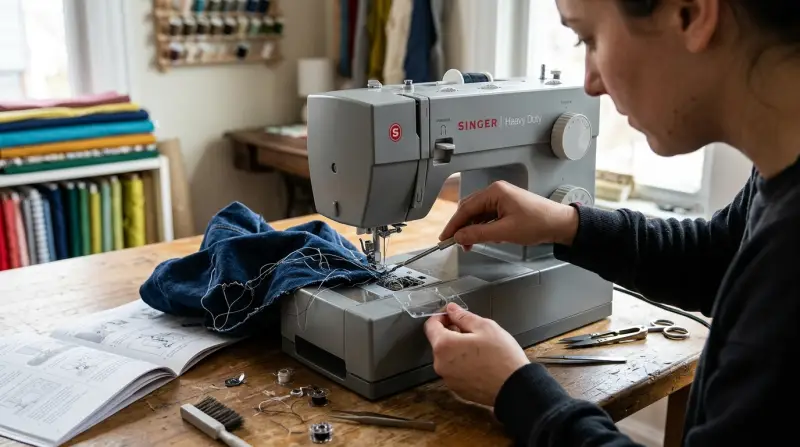
One of the most common problems with the Singer Heavy Duty 4411 is thread jamming, especially around the bobbin. You might notice strange noises, or the needle may stop moving. This can stop your project and even break needles.
Why Thread Jams Happen
- Wrong Threading: If you don’t follow the correct steps for threading the upper thread, the machine can’t form proper stitches. Skipping a guide or not pulling the thread into the take-up lever are easy mistakes.
- Poor Bobbin Winding: If the bobbin is wound unevenly or is loose, the thread can tangle inside the bobbin case.
- Wrong Bobbin Type: The Singer 4411 needs Class 15 bobbins. Using bobbins from other machines might seem harmless, but they can cause jams or uneven stitches.
- Lint and Dirt: Over time, lint and bits of thread collect in the bobbin area. This buildup makes it easier for threads to snag and jam.
- Thread Quality: Cheap or old thread often breaks or sheds fibers, leading to tangles.
How To Fix And Prevent Thread Jams
- Re-thread Carefully: Always raise the presser foot before threading. This opens the tension discs and lets the thread sit correctly. Follow the path in your manual, step by step.
- Check the Bobbin: Make sure the bobbin is wound evenly and inserted with the thread pulling in the correct direction (usually counter-clockwise for the 4411). Never overfill the bobbin.
- Clean Regularly: Every few projects, open the bobbin case and remove lint with a small brush. Avoid blowing, as this pushes dust deeper.
- Use Good Thread: Choose quality thread made for sewing machines. Old, dusty thread can cause many problems.
- Replace Bent Needles: If you hit a pin or the needle is bent, it can cause jams. Replace needles regularly.
Non-obvious tip: If you get frequent jams after changing thread or bobbin, check if you accidentally missed a step in threading. Even advanced sewers sometimes skip the take-up lever by mistake.
Skipped Stitches
Skipped stitches are frustrating. You expect a smooth line, but gaps appear in your seam. This looks bad and makes seams weak.
Why Skipped Stitches Happen
- Dull or Wrong Needle: Using the wrong size or a dull needle means it can’t pierce the fabric properly.
- Incorrect Thread and Needle Combo: Heavy fabric with a thin needle, or lightweight fabric with a thick needle, often leads to missed stitches.
- Improper Threading: If the machine isn’t threaded exactly right, the needle can’t pick up the bobbin thread every time.
- Damaged Needle Plate: If the plate under the needle is scratched or bent, it can deflect the needle slightly.
- Machine Needs Cleaning: Lint under the needle plate or around the feed dogs can disrupt the needle’s movement.
How To Fix And Prevent Skipped Stitches
- Change Needles Often: Use a fresh needle for every new project, or every 6-8 hours of sewing. For denim or canvas, use a strong, sharp needle like size 16/100.
- Match Needle to Fabric: Light fabric = small needle (size 9/65 or 11/75). Heavy fabric = larger needle (16/100 or 18/110).
- Re-thread Machine: Remove both threads and start over. Sometimes, a small tangle can cause big problems.
- Inspect Needle Plate: If you see any rough spots, polish lightly with fine sandpaper or replace the plate.
- Clean Machine: Remove the needle plate and bobbin case. Clean out all dust and thread bits.
Non-obvious tip: When sewing stretchy fabrics, use a ballpoint needle. Regular sharp needles skip stitches on knits.

Uneven Or Loose Stitches
Sometimes, your stitches look messy—some are tight, others are loose, or the fabric puckers. This problem makes your sewing look unprofessional and weakens seams.
Why Stitches Become Uneven
- Incorrect Tension Settings: The Singer 4411 has a tension dial. If the number is too high, stitches look tight and pucker the fabric. Too low, and stitches are loose or loopy.
- Unbalanced Bobbin Tension: If the bobbin case tension is off, it can create uneven stitches.
- Poor Thread Quality: Cheap or fuzzy thread changes tension as you sew.
- Incorrect Presser Foot Pressure: If the foot doesn’t press the fabric evenly, the stitches may vary in size.
How To Fix And Prevent Uneven Stitches
- Adjust Upper Tension: Start at the middle setting (usually “4” on the 4411). Test on scrap fabric. If stitches look uneven, adjust up or down a little.
- Check Bobbin: Make sure the bobbin is inserted properly and wound smoothly. If the bobbin case tension feels off (thread pulls out too easily or too tight), have a technician check it.
- Use Consistent Thread: Use the same brand and type of thread on top and in the bobbin.
- Adjust Presser Foot Pressure: The 4411 allows you to change the presser foot pressure. For thick fabric, increase pressure. For thin fabric, decrease it.
Non-obvious tip: Sometimes, uneven stitches happen only at the start of a seam. Hold the thread tails behind the presser foot for the first few stitches to keep them tight.
Needle Breaking
A broken needle is not just annoying it can damage your project, or even the machine.
Why Needles Break
- Sewing Over Pins: Hitting a pin is the fastest way to break a needle.
- Wrong Needle for Fabric: A small needle on thick fabric bends and snaps.
- Pulling the Fabric: If you pull fabric while sewing, the needle can twist and break.
- Bent Needle: Even a slightly bent needle is much more likely to break.
- Machine Out of Timing: If the hook and needle are not synchronized (rare, but possible if the machine is dropped or forced), needles break regularly.
How To Fix And Prevent Needle Breakage
- Remove Pins Before Sewing Over Them: Place pins at right angles to the seam so you can pull them out easily.
- Use Correct Needle Type: For thick fabric, always use a heavy-duty needle.
- Let the Machine Feed the Fabric: Do not push or pull fabric. The feed dogs will move it at the right speed.
- Check for Bent Needles: Replace needles at any sign of bending, or after hitting a pin.
- Get Professional Service: If needles break for no clear reason, have a technician check the machine’s timing.
Non-obvious tip: When sewing over bulky seams (like denim hems), use a “hump jumper” (a small plastic tool) or fold a scrap of fabric behind the needle to level the presser foot.
Machine Not Picking Up Bobbin Thread
Sometimes, you lower the needle but it doesn’t catch the bobbin thread. You can’t start sewing.
Why This Happens
- Incorrect Needle Position: The needle is not all the way up or down when threading.
- Bad Threading: If you miss the take-up lever, the needle won’t catch the bobbin.
- Bent or Wrong Needle: A bent needle misses the bobbin thread.
- Debris in Bobbin Area: Lint or broken threads block the hook mechanism.
- Timing Issues: If the machine’s hook is out of sync, it can’t grab the bobbin thread.
How To Fix And Prevent This Problem
- Re-thread Top and Bobbin: Remove all thread and bobbin. Thread again, step by step.
- Check Needle: Replace with a new, straight needle of correct size.
- Clean Bobbin Case: Remove all lint and thread pieces.
- Raise Take-Up Lever: Make sure it’s at the top before threading.
- Seek Help for Timing: If nothing works, a sewing machine repair technician can adjust the timing.
Non-obvious tip: If you just cleaned the machine and now it won’t pick up thread, check that you reassembled the bobbin case and needle plate correctly.
Motor Is Loud Or Running Slowly
A strong motor is a big feature of the 4411. But sometimes, the machine is much louder than usual, or the motor seems slow.
Common Reasons
- Lack of Oil: All mechanical parts need oil to move smoothly.
- Lint in Gears or Drive Shaft: Dust buildup makes the machine struggle.
- Old Motor Brushes: After many years, motor brushes wear down and need replacing.
- Overloading: Sewing very thick fabrics for long periods can overwork the motor.
- Power Issues: Using the wrong voltage or a damaged power cord can cause problems.
How To Fix And Prevent Motor Issues
- Oil the Machine: Follow the manual. Use sewing machine oil only. Too much oil can attract dust, so wipe off excess.
- Clean Deeply: Every few months, remove covers and clean all moving parts. A vacuum with a small nozzle works well.
- Replace Motor Brushes: If the motor is slow and you smell burning, get a technician to check the brushes.
- Give Machine Breaks: For heavy sewing, pause every 20 minutes to avoid overheating.
- Check Power Supply: Use the correct voltage and inspect cords for damage.
Non-obvious tip: If the machine is suddenly loud after changing thread or needle, check for a loose screw or part near the needle clamp.

Fabric Not Feeding Properly
If your Singer 4411 doesn’t move fabric smoothly, you get short stitches or stuck fabric.
Why This Happens
- Feed Dogs Lowered or Dirty: The feed dogs grip fabric. If they’re down or dirty, nothing moves.
- Presser Foot Pressure: Too little pressure means the fabric won’t move.
- Heavy or Sticky Fabrics: Vinyl or coated fabrics stick to the foot.
- Wrong Foot: Using a zipper foot for regular sewing won’t feed fabric evenly.
How To Fix And Prevent Feeding Problems
- Raise Feed Dogs: Check the lever and make sure feed dogs are up.
- Clean Feed Dogs: Brush out lint and wipe with a cloth.
- Adjust Presser Foot Pressure: Increase for thick fabric, decrease for thin.
- Use Right Foot: For vinyl or leather, use a Teflon foot or walking foot.
- Try Tissue Paper: Place tissue under sticky fabric for smoother feeding, and tear away after sewing.
Non-obvious tip: If fabric isn’t feeding with thick seams, lift the presser foot, reposition fabric, and start with the needle in the fabric.
Buttonhole Problems
The 4411 makes simple buttonholes, but sometimes they don’t come out even.
Why Buttonholes Fail
- Improper Marking: If you don’t mark fabric clearly, buttonholes end up crooked.
- Wrong Foot Attachment: The buttonhole foot must be attached firmly.
- Thread Tension Issues: Too tight or loose thread causes messy stitches.
- Fabric Not Stabilized: Soft or stretchy fabric needs interfacing.
How To Fix And Prevent Buttonhole Issues
- Mark Carefully: Use a fabric-safe pen to mark both ends of the buttonhole.
- Attach Foot Properly: Push the foot in until it clicks. Check that it’s centered.
- Stabilize Fabric: Use interfacing or a scrap of stabilizer.
- Test First: Try a buttonhole on a scrap before sewing on your project.
- Adjust Tension: If buttonhole stitches are loopy, tighten the upper thread a little.
Non-obvious tip: For very thick fabric, sew the buttonhole in two steps (one side, then the other) for better results.

When To Seek Professional Help
Most Singer 4411 problems are easy to fix at home. But if you notice these warning signs, it’s time for a professional:
- Needles break for no clear reason
- Machine makes grinding or scraping sounds
- Motor smells like burning or won’t run
- Tension dial doesn’t change stitches
- Machine is dropped or hits something hard
Professional service can save your machine from bigger problems later.
Final Thoughts
The Singer Heavy Duty 4411 is a strong, reliable machine. But even the best machines need care. Most problems come from simple mistakes—threading wrong, using old needles, or skipping cleaning. If you know what to check and how to prevent issues, you’ll sew with fewer interruptions and better results.
For more on sewing machine maintenance, Singer’s official website has guides and videos that help, no matter your experience.
With practice and these tips, you’ll solve most 4411 problems yourself and enjoy sewing for years.